-
1. Account Setup
To register for Learning Hub, sign in if you have an account or click "Sign up" to create one. Choose your user type, provide details, and click "Sign-up." First-time users must verify their email address.
1. Account Setup
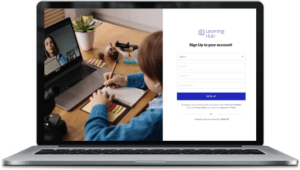
Follow these steps:
- Go to the Learning Hub Sign Up page.
- Select Student, Parent/Guardian, or Teacher.
- Enter your information in the fields.
- Select Sign Up to create your account.
-
2. Navigations
After signing in, the user can access various pages and options, including a pop-up from the right icon.
2. Navigations
-

Home/Performance: This is the main landing page or dashboard for Teacher to access the list of the students with their name, performance (showing the performance of the lessons).
-

Performance (Detailed level): This section allows the Teacher to view and track the student performance metrics, achievements, or progress within the system.
-

Learning: The learning page serves the list of new, completed and potential lessons for the students.
-

Global Search: This powerful search functionality enables users to find specific content or information across the platform quickly. It ensures easy access to relevant resources or data without the need to navigate through various sections manually.
-

Profile: Users can access and manage their profile information, such as name, contact details, and any other relevant personal data. It offers an opportunity to keep the profile up-to-date and accurately represent the user’s identity within the platform.
-

Messages: This option enables users to access and interact with messages received from other users or the system itself. It serves as a communication hub for exchanging information, inquiries, or support requests.
-

Change Password: Users can utilize this option to change their account password securely. Regularly updating passwords enhances account security and helps protect sensitive information from unauthorized access.
-
-
3. Chat and Messages
Users can conveniently access a dedicated chat message screen within their account for seamless communication between students, teachers, and parents added as contacts.
-
4. How to connect
Users can add their student by providing relevant details. This involves filling out specific fields or forms with information about parents and teachers they want to include in their account.
Frequently Asked Questions
-
How do I get started with the Learning Hub as a teacher?
To get started, simply visit our Learning Hub website and sign up for a teacher account. Once registered, you’ll have access to a comprehensive dashboard where you can explore the platform’s content, curate lessons, track student progress, and communicate with parents and students.
-
-
-
-
-
How do I get started with the Learning Hub as a teacher?
To get started, simply visit our Learning Hub website and sign up for a teacher account. Once registered, you’ll have access to a comprehensive dashboard where you can explore the platform’s content, curate lessons, track student progress, and communicate with parents and students.